
Your cameras already see it. Now they can tell you.
CameraOS connects to the cameras and recorder you already have and turns what they see into answers: how long the line is, which table just freed up, who needs help. Ask in plain English and get the clip. Video stays on your machine.
Same cameras, same moments. Drag to see what changes.
An NVR app tells you something moved. CameraOS tells you what it means.
Pick your kind of place. See what your cameras could tell you.
How long is the line? Which tables are free?
Waiting line
How long is the line right now, and when is the best time to go?
Restaurant & café
Free tables, how long guests stay, and how busy it is.
Store aisle
Which shelves make shoppers stop, for how long, and where the aisle is busiest.
Occupancy
People in each zone against your limit, green to red as it fills, with alerts on over and under.
Know the moment someone needs you.
Care & fall
Someone falls: staff are alerted within seconds, and escalated if they don't get up.
Daycare
A face-blurred view for parents, and safety signals for staff.
Occupancy
People in each zone against your limit, green to red as it fills, with alerts on over and under.
Alert notifier
This camera's alerts on your phone through Telegram or any webhook, with a snapshot. Flood-safe.
Is the line running? Who came in? Is there a space?
Factory line
Throughput, stoppages and off-spec items — for any product you can name.
Parking
Free spots, cars in and out, time parked, plates and overstays.
License plates
Reads every plate and checks it against your allow and deny lists, live.
Gate controller
Opens the barrier for plates on your allow list, one relay pulse per car. Everything else stays shut.
Fewer screens to watch. Only the moments that need a person.
Loitering
Someone lingering longer than they should, with every person's time in view live.
Intrusion
Draw a protected zone, set the hours, and get an alert the moment someone walks in.
Line crossing
A directional tripwire: live tallies each way, and an alert when someone crosses the wrong way.
Abandoned object
A bag left behind with nobody near it, while luggage next to its owner never fires.
Every app, and the question it answers.
Tap any app to watch it run on a demo camera. Install one in about a minute: pick a camera, draw the zone, keep the defaults.
Plug into what's on the wall. Keep the video on your machine.
Your cameras & NVR
Keep what's on the wall. CameraOS connects to almost every IP camera and recorder: anything that streams RTSP or speaks ONVIF, from Hikvision, Dahua and Axis to Hanwha Vision, Bosch and i-PRO.
CameraOS, on site
Your own Mac, on site, records every camera, finds people, vehicles and objects frame by frame, and keeps a searchable event log.
Answers wherever you look
Live numbers, alerts that wait for a person, and plain-English answers, on a phone, a laptop or the video wall.
Add apps to any camera.
Pick a camera, draw the zone on live video, keep the defaults. One AI pass on a camera serves every app on it.
A camera clinic, built in.
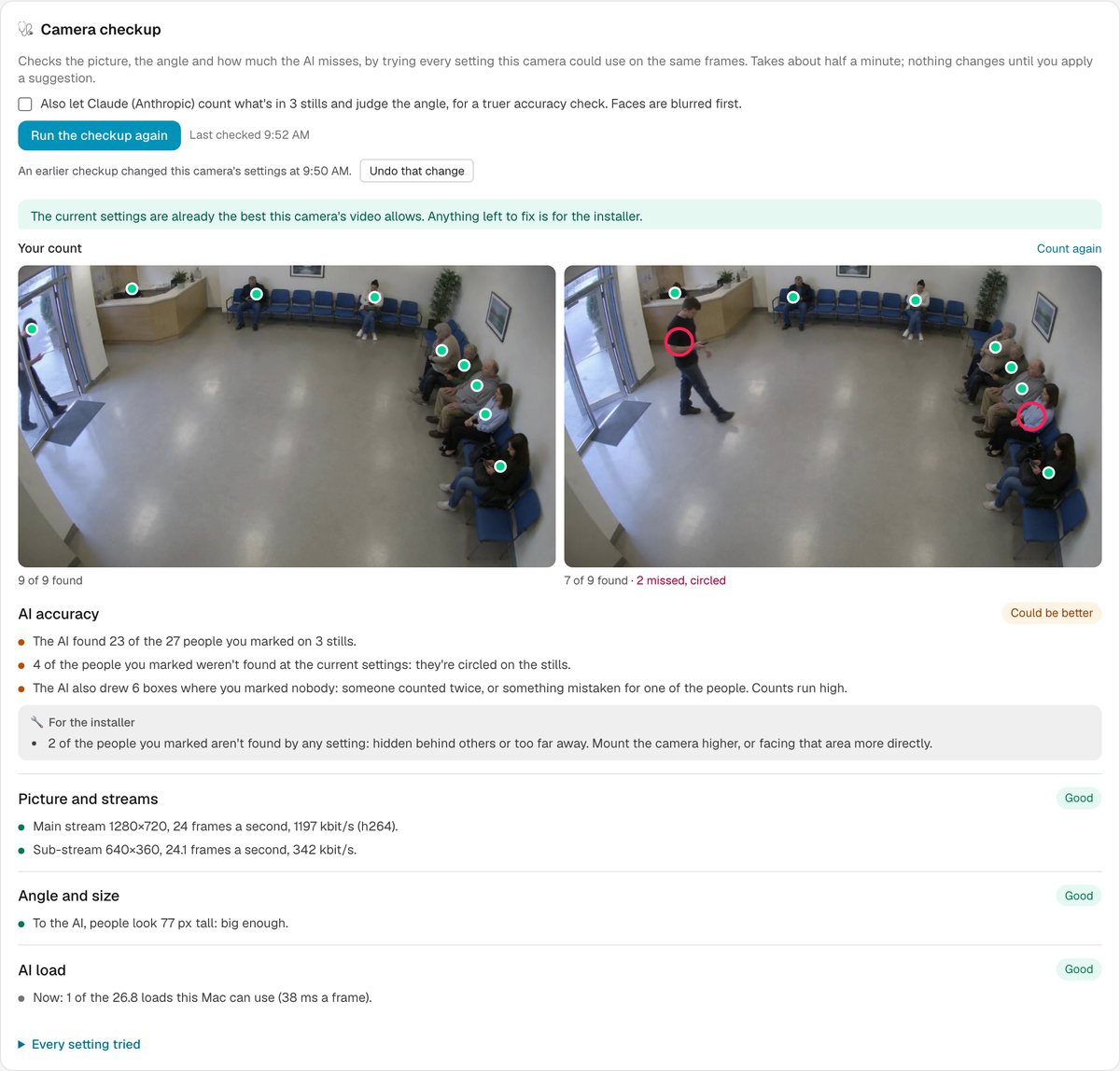
Is this camera set up right? In about 30 seconds the checkup troubleshoots it: it watches the camera, measures the picture and the streams, and tries every setting the camera could use on the same frames. Then it tells you what to change.
Check
Resolution, frame rate, damaged frames. Too dark, backlit, blurry, night mode. One green, amber or red row each for AI accuracy, picture and streams, angle and size, and AI load.
Retune
See what the AI finds before and after. Apply the suggestion and the camera keeps its zones; Undo puts it back. Nothing changes until an admin applies it.
For the installer
What only the camera or a ladder can fix: raise the sub-stream, turn on WDR, add light, refocus, mount it closer or higher.
Count it yourself
Tap each person on three stills. The checkup scores every setting against your count and circles anyone the AI missed. Free, and nothing leaves your machine. Or let your own AI count face-blurred stills, for a few cents.
Not another box. Not another cloud. Answers.
 CameraOS
Ask your cameras. Try it here.
Plain English in, a plain answer out. Every fact points to the event it came from. Tap it and the clip plays. These are real answers from our demo cameras.
Or any OpenAI-compatible service. Choose a local model and nothing leaves your machine.
Right now (12:30 PM): 6 people are in line, and the estimated wait is under a minute (about 9 seconds). The line is moving fast: 28 people served in the last 15 minutes, which works out to about 112 an hour.
Best time to go: if you get there while it's open, the wait is usually short, so the main difference between times is how many people are in line.
- Shortest lines: evenings around 8–11 PM. On Friday night there were about 3.5–5 people in line on average. Early mornings are similar: about 3–5 people around 8 AM.
- Busiest: midday through late afternoon, about 11 AM–6 PM. On weekdays the line averaged 7–8 people, and the busiest hours were around 12–1 PM on Tuesday.
- Today so far is lighter than weekdays: about 5 people on average from 10 AM to noon.
Some one-off hours show average waits of 20–40 minutes, even though the line had a normal 5–6 people. That's more likely a counting glitch than a real wait, so I wouldn't plan around those numbers.
This is based on only about 5 days of footage, one each for Tuesday through Saturday, so treat it as a rough pattern rather than a reliable schedule.
現在幾乎不用等:目前排隊約 9 秒(0.15 分鐘)。隊伍裡有 5 人,過去 15 分鐘服務了 29 位客人,換算每小時大約 116 人。
什麼時候去最好?其實任何時段都等不久。過去幾週的平均等候時間都在 30 秒以內,差別只有幾秒:
- 最快:週四全天,以及週三下午 4 點到晚上 7 點左右,平均只要 7–8 秒。
- 最慢:週二上午 11 點到下午 3 點最忙,平均 21–25 秒,這段時間服務的人數也最多。
- 今天(週六):早上 8 點到中午平均約 15–17 秒,中午以後降到約 15 秒。
紀錄裡沒有週日和週一的資料,其他日子也有不少時段沒有紀錄,所以這兩天沒辦法比較。
整體來說,想避開人潮可以挑平日傍晚,或盡量不要在週二中午前後去。不過就算最忙的時候,排隊也不到半分鐘。
今の待ち時間はほぼゼロです。 「Ice Cream Line · NYC」の現在の推定待ち時間は約9秒(0.15分)です。列には6人並んでいて、直近15分で28人が注文を済ませています(1時間あたり約112人のペース)。列の進みがとても速い状態です。
行くのにおすすめの時間帯(10月27日〜31日の5日分の記録より)
- 一番空いているのは17時〜20時ごろで、平均の待ち時間は約7〜9秒です。19時台が最も短くなっています。
- 一番混むのは11時〜15時ごろです。来店者数は11時台が最も多く、平均の待ち時間は14時台が最長で約24秒でした。
- 10時台と16時台も比較的空いていて、平均の待ち時間は11〜13秒です。
ただし、混む時間帯でも平均待ち時間は30秒未満で、この5日間で最も長かった待ち時間も83秒でした。いつ行っても待つのは長くて1分ちょっとです。ゆっくり並びたいなら夕方(17時〜20時)がおすすめです。
※記録が5日分しかないため、曜日ごとの傾向まではわかりません。
Ten alerts are still open. The longest wait in the ice cream line was 45 seconds, at 8:17 AM.
- Care Home · Room 14: a fall at 10:34 AM , then "needs help" at 10:35
- Daycare · Toddler Room: someone near the exit at 10:33 AM
- Ice cream line: 58 people served since 8:08 AM
The waiting room was busy from late morning onward, usually with 5–6 people at a time. It was fullest around 8:08 AM, 10:22 AM and 11:30 AM, each with 11 people, well over the room's limit of 7.
How it went through the day
- Overnight to 8 AM: quiet and only lightly recorded, with about 2–3 people on average.
- 8 AM: a burst of people, averaging 5.4 and peaking at 11 at 8:08 AM.
- 9 AM: almost nothing was recorded this hour, so the camera may have been offline or not reporting.
- 10 AM to 1 PM: steadily busy, averaging 5.3–5.8. Counts of 9–11 came up again and again, most often between 11 and 11:58 AM.
- 1 PM: quieter, averaging 2.9, though it still briefly hit 10 at 1:17 PM and 1:25 PM.
- 2 PM to now: the busiest stretch on average, at 6.1. It reached 10 several times between 2:29 PM and 2:47 PM.
Right now: 6 people, just under the limit of 7.
Over-capacity alerts: there were 12 today, starting at 10:24 AM and clustered after 2:38 PM . Each cleared within about 5 seconds. Oddly, every alert shows only 5 people even though the limit is 7, and none went off during the 8 AM peak. The alert and the head count don't match, so the alert setup may be worth checking.
The camera recorded about 4,000 detections today, but that badly overstates actual visitors. The tracker often counts the same person more than once, and most detections lasted only seconds. Use the people-in-room counts above to judge how busy it was.
今天候診室中午前後最忙,下午 2 點後又變多。以下根據畫面中的人數抽樣統計:
- 最擠的時候:瞬間最多 11 人,出現在 8:08 AM、10:22 AM 和 11:30 AM。
- 整體最忙的時段:11 AM 那個小時平均約 5.8 人,12 PM 約 5.5 人。這兩個小時常常衝到 10 人,例如 11:21、11:56、12:30、12:56。
- 下午 1 點比較空,平均約 2.9 人。2 點後又忙起來,平均約 6.1 人,是今天平均最高的一個小時。
- 現在(2:52 PM):候診室裡有 5 人。
人數警示:今天一共響了 12 次,但每次都在約 4 秒內自動解除,算是短暫擠了一下。10:24 AM 那次是第一次 。下午 2:38 到 2:47 之間響了 5 次,最近一次是 2:47 PM ,跟現在人多的情況一致。
不過有兩點要注意:
- 警示上記錄的人數上限是 7 人,但觸發時記到的人數都是 5 人,跟上限對不起來。建議確認一下人數上限的設定。
- 凌晨、早上 9 點那個小時,還有下午 1 點,資料都比較少,可能是攝影機沒有持續回報。所以這幾個時段的數字只能參考,9 點時的實際人數無法判斷。
另外,人次(進出次數)的統計重複計算很嚴重,每小時算出好幾百人次,不能當成實際來診人數,所以上面都用畫面中的人數來看。
今日(0時〜現在14:52)のClinic · Waiting Roomの様子をまとめました。
現在の様子
- 待合室にいるのは5人で、上限の7人以内です。
今日の混み具合
- 平日の診療時間帯にあたる8時台と10時〜14時台が混んでおり、1時間ごとの平均は約5〜6人でした。
- 上限の7人を超えて8〜11人になった時間が何度もありました。特に11時台は、ほぼずっと8人以上でした。
- 13時台は平均2.9人で、一度空いています。14時台はまた混み始め、ここまでの平均は6.1人です(まだ途中の集計です)。
一番混んだ時間
- 最多は11人で、8:08 AM、10:22 AM、11:30 AMの3回ありました。
- 時間帯で見ると、11時台(11:00〜12:00ごろ)が今日のピークです。
注意点
- 人数オーバーの通知は12件出ました(例: 10:24 AM、 11:20 AM、 2:47 PM)。ただし、どれも約4秒で自動的に解除されています。また、記録上の人数は5人で、実際に人数が多かった時間帯ともずれています。通知の数で混み具合を判断するのは避けたほうがよいです。
- 9時台と深夜の記録はごく一部しか残っていません。そのため、この時間帯の人数は参考程度に見てください。
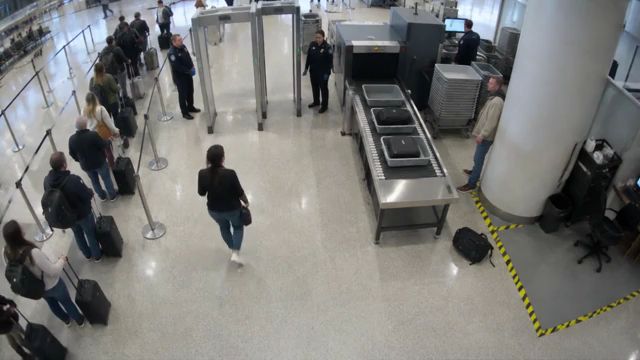 LIVEAirport · Security Checkpoint
Today's alerts all come from one ongoing case, not several separate bags. The camera first flagged an unattended bag at the Security Checkpoint last night (Friday) at 8:25 PM. It has kept alerting ever since: 41 alerts in total, 28 of them today.
Today's alerts:
- Overnight and early morning: 1:42 AM , then 5:10, 5:23, 6:41, 7:09, 7:26, 7:42 and 8:07 AM. Each time the bag had been alone for about 12–18 minutes.
- Late morning: 10:17 AM . The bag had been alone for about 17 minutes.
- From 8:17 AM on: alerts came roughly every 10–30 minutes, usually after the bag had been alone for only about 15–20 seconds. The most recent were 1:55 PM , 2:25 PM and 2:35 PM .
Status: Staff acknowledged every alert up to 2:25 PM, but the alerts keep coming back. The 2:35 PM alert is still open.
An alert that has kept repeating for about 18 hours probably means the object is still there. It may be a real forgotten bag, or something the camera mistakes for a bag, like a bin, sign or tray stack. I can't tell which from the data. I'd send someone to look at the snapshots and check the spot in person.
今天「Airport · Security Checkpoint」的無人行李警報全都來自同一件事,不是好幾件不同的行李。
- 這件行李從昨天(10/30)晚上 8:25 就開始被發現獨自放著 ,之後系統每隔一段時間就重發一次警報。
- 今天一共重發了 28 次:第一次在凌晨 1:42 ,最近一次在下午 2:35 。
- 早上 8:17 以後,每次警報記錄的「沒人在旁邊的時間」大多只有 15–20 秒(之前是 12–17 分鐘)。這可能代表有人短暫靠近過行李,但行李一直沒被拿走,所以警報一再出現。這只是推測,資料沒辦法證實。
- 今天每次警報都有人確認,但都沒有處理掉:凌晨 1:42 那次過了約 3.5 小時才確認,早上 8:28 那次約 1.8 小時,其他大多在 10–30 分鐘內。
- 下午 2:35 那次警報到現在還沒有人確認。
這件行李放在現場已經超過 18 小時了,建議派人到現場實際查看並移走。
今日の置き去り荷物の通知は28回ありました。ただし、どれも同じ1件の荷物についての繰り返し通知で、荷物は今も片付けられていないようです。
- 最初の検知:昨日(10/30)の午後8:25。システム上は、この荷物の件は昨夜からずっと続いている扱いです。
- 今日の最初の通知:午前1:42
- 朝の通知:5:10〜8:28の間に繰り返し出ています
- 日中の通知:10:17以降はほぼ10〜30分おきに出ています
- 最新の通知:午後2:35 。この通知はまだ誰も確認していません。
昨日からの通算では41回通知されています。昼ごろからは、荷物のまわりに誰もいない時間が15〜20秒になると、すぐにまた通知が出ています。これは荷物のそばに人が来ては離れているのに、荷物そのものはずっと残っているということです。
今日の通知は最新の1件以外すべて確認済みになっています。ただ、確認の時刻は毎回、次の通知が出た時刻とぴったり同じです。新しい通知に置き換わったことで自動的に確認済みになった可能性が高く、スタッフが実際に対応したとは限りません。荷物が今もあるか、現場で確かめることをおすすめします。
Right now 6 of 14 spaces are free in Lot B (8 cars parked).
The lot never actually filled up in the footage we have. It got down to 2 free spaces at its busiest, and that happened every day it was recorded. Those last 2 spaces never showed as taken. They may sit outside where the camera can reliably spot a car, so treat "2 free" as effectively full.
When it's usually tightest:
- 5–7 PM is the busiest time. It averages about 4 free spaces, and 2–3 free for most of that window.
- Late morning, around 11 AM, is the next busiest, at about 5 free on average.
- Around midnight it also gets tight again (about 5 free).
- Overnight (1–6 AM) and around 9 PM are the quietest, with about 9–11 free.
If today follows the usual pattern, expect it to drop to 2–3 free spaces from about 5 PM onward.
These are rough patterns, not firm ones. They come from only about 4 days (Oct 27–31), and some hours have gaps in the data.
Car Park · Lot B 目前有 6 個空位(共 14 格,已停 8 輛)。
通常什麼時候會停滿? 從 10/27(週二)到今天的紀錄來看,這座停車場一次都沒有完全停滿。空位最少的時候是剩 2 格,而且這種情況出現過很多次。最滿的時段如下:
- 傍晚 5–7 點:平時最擠,平均只剩約 4 格。5 點那一小時約有四成的時間只剩 2 格。
- 上午 10 點到下午 1 點:平日常降到 4 格左右。
- 深夜 11 點到凌晨 1 點:偶爾也會降到只剩 2 格。
週六目前看起來比較空,今天最少時也還有 5 格。
要注意的是,資料只有大約 5 天,每個時段只有一天的紀錄,中間也有缺漏,所以上面只能當作初步趨勢,還不能算是固定的規律。
Car Park · Lot B は今、14台分のうち8台が埋まっていて、空きは6台です。
いつ満車になるかについては、10月27日〜今日までの記録で満車(空き0台)になったことは一度もありません。いちばん少なかったときでも空きは2台でした。
満車に近くなりやすい時間帯は次のとおりです。
- 午後4時〜6時ごろが最も混みます。 特に午後5時台は空きが平均で約3台、最も少ないときで2台でした。
- 平日の午前10時〜午後1時ごろも、空きが3〜4台程度まで減ることがよくあります。
- 夜遅くから朝にかけては比較的空いています。
今日(土曜)は空きが5台より少なくなったことはなく、平日より余裕があるようです。
この結果には注意点があります。記録の途中で駐車スペースの設定数が12台、17台、14台と変わっています。また、10月30日の日中など記録が抜けている時間もあります。そのため、上の傾向はおおよその目安として見てください。
Already use Claude or Gemini? Just ask.
Connect CameraOS to the AI assistant you already use and ask about every camera in plain words: what's happening now, show me the café, build this week's report. It runs on the AI plan you already have, with no extra AI fees from CameraOS.
Works with Claude, Gemini in Google Antigravity, OpenAI Codex and other assistants that support local MCP servers. MCP is the open standard AI assistants use to connect to tools.
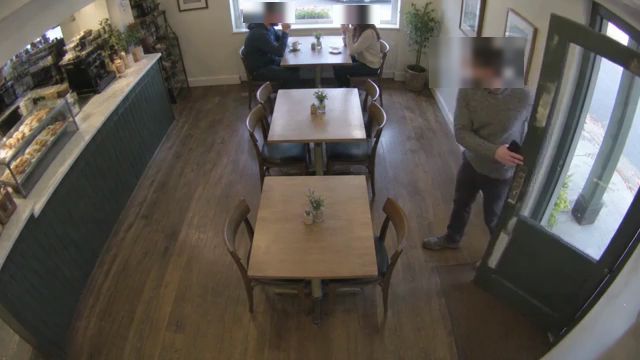
A real conversation: Claude using CameraOS's MCP tools on our demo cameras, Nov 4 2026. CameraOS blurred the faces before the picture left the machine.
Your cameras. Your machine. Your footage.
See the same daycare room the way staff see it and the way a parent's link shows it.
Daycare · Toddler Room · demo camera (AI-generated footage)
No face recognition, by choice. Two optional checks (factory Inspect, daycare Summarize) send a single frame only when you tap them.
We tell you how far to trust each number.
Pick one to see the data or the rule behind it.
CameraOS, in under two minutes.
Everything above, in one film. Share it with your team before your walkthrough.
Product screens are the real CameraOS app on demo cameras. The everyday moments at the start are AI-generated dramatizations.
Start with the cameras on your wall this week.
Point CameraOS at your cameras or NVR. Brand presets do the rest.
Choose the questions you want answered. Draw a zone, keep the defaults.
"What happened at the front door today?" Watch the clip.
What people ask first.
Do I need new cameras?
No. CameraOS connects to almost every IP camera and recorder: anything that streams RTSP or speaks ONVIF, from Hikvision, Dahua and Axis to Hanwha Vision and Bosch, with presets for Hikvision, Dahua, Axis, Uniview and Reolink. Keep your NVR if you like it.
Where does my video go?
Nowhere. Recordings stay on your own machine, the Mac running CameraOS. Shared views, like a parent link, are face-blurred, and if blurring can't keep up the frame isn't sent.
Which AI answers my questions?
Your choice, with your own key: Claude, ChatGPT, Gemini, NVIDIA, OpenRouter, any OpenAI-compatible service, or a local model through Ollama. Ask reads the event log for the cameras you pick, never the video.
Does it work with my AI assistant?
Yes. Connect CameraOS to Claude, Gemini in Google Antigravity, OpenAI Codex or another assistant that supports local MCP servers, and ask about your cameras right in your chat: live numbers, recent events, reports and face-blurred pictures. It runs on the AI plan you already have, with no extra AI fees from CameraOS. It's read-only, it runs on your machine, and each camera can share numbers and blurred pictures, full pictures, or nothing.
What does it run on?
A computer on site; today that's a Mac with an Apple GPU. A small CameraOS Edge box is on the roadmap.
How accurate is it?
We don't quote one percentage, because it depends on the camera and the job. Every app says what it measures and where it's weak, and every alert and event links to its clip.
Can I check it from my phone?
Yes, on the same network, and alerts can go to Telegram or a webhook. Away from the site, use a private network such as Tailscale for now; built-in secure remote access is on the roadmap.
Which languages does it speak?
The app and Ask both work in English, 繁體中文 and 日本語.